
SmartPrinter Print without rewriting your application
SmartPrinter converts print data from ERP and legacy systems for modern laser printers and designs the output to your requirements - without changing the original application.
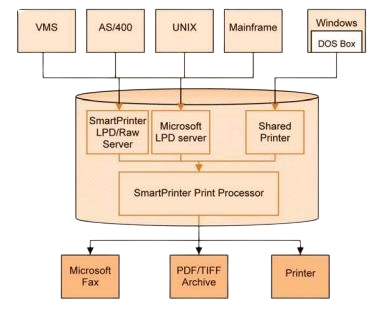
What SmartPrinter does
Upgrade printing systems
Applications that print to older emulations (IBM Proprinter, Epson, Prescribe) can print to new PCL laser printers without any change to the original application.
Print, fax or archive
Send the same output to a physical printer, a fax server or the document archive as PDF/TIFF - from one print stream, by rules.
Checks on blank paper
Print complete checks on blank paper with MICR toner - including the magnetic line, company logo, bank logo and check design.
Forms and templates
Design forms and templates - with graphics and moved fields - and store them in the software or the printer.
How it works
SmartPrinter simulates a printer: LPD/LPR, RAW (port 9100 or another) or a shared printer.
Commands are translated (for example Epson to PCL), logos are added, trays are changed - by a pre-defined set of rules.
The new print file goes to the physical printer - or to a fax server, or to the archive as PDF/TIFF.
SmartPrinter FAQ
What is SmartPrinter?
SmartPrinter is SPS print-stream software that converts print data from ERP and legacy systems for modern laser printers and designs the output – without changing the original application.
Do we need to change our application?
No. SmartPrinter receives the existing print stream and transforms it, so the original application stays as it is.
Can SmartPrinter print checks?
Yes. It prints complete checks on blank paper with MICR toner, including the magnetic line, logos and check design.
Where can the output go?
To a physical printer, a fax server, or the archive as PDF or TIFF.
Modernize printing without touching your application
Tell us which systems and printers you use.