Proof of delivery · no app

ShipSnap QR Proof of delivery without a driver app

Paperless proof of delivery for outsourced and subcontracted drivers. The recipient scans a QR code on the delivery note or label, signs on their own phone, and the signed document syncs straight to your ERP.

Any driverNo app to installSignature + photoERP sync
No appfor drivers or recipients
Any carrier3PL, couriers, subcontractors
Real timesigned record in your ERP
// What is ShipSnap QR

What is ShipSnap QR?

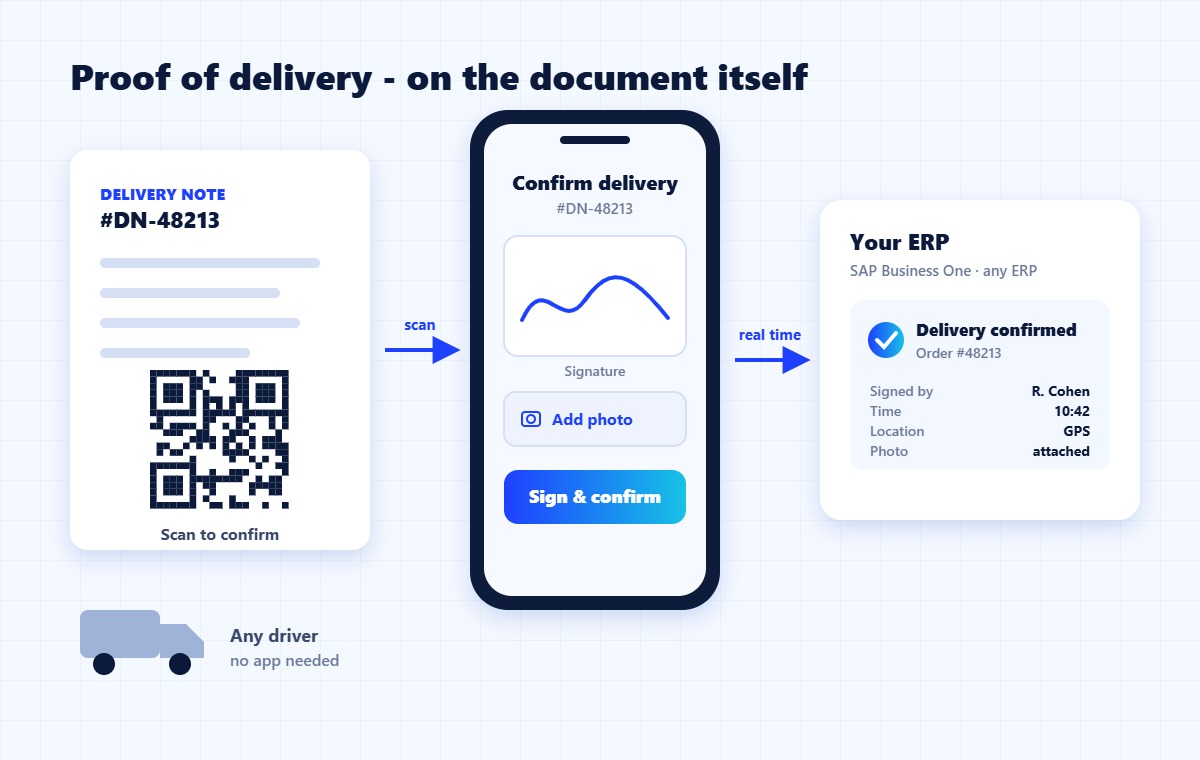
ShipSnap QR is the app-free version of ShipSnap proof of delivery: a QR code printed on each delivery note or label lets the recipient confirm and sign on their own phone, and the signed record syncs to your ERP – even when you don’t control who delivers.

ShipSnap QR flow: the recipient scans the QR code on the delivery note, signs on their own phone, and the confirmation syncs to the ERP
// Who it’s for

When you don’t control who delivers

Many deliveries are made by drivers you don’t manage: third-party carriers, couriers, subcontractors, or a distribution center that consolidates loads. You can’t ask them to install your app - but you still need proof that the goods arrived. ShipSnap QR moves the proof of delivery onto the document itself.

Third-party carriersCouriers and subcontractorsShipments through a distribution centerDrivers that change every day
// Why ShipSnap QR

Why teams choose ShipSnap QR

// Outcome

Business outcome

Every delivery ends with a signed, time-stamped record in your ERP - no matter who delivered it. Fewer delivery disputes, faster invoicing, and no paper to collect, scan or store.

// Capabilities

Core capabilities

  • A QR code for each order, printed on the delivery note or label.
  • The recipient scans it with their own phone - a signature field and photo capture open in the browser.
  • Date, time, location, signature and photo captured in one record.
  • Optional text alerts that tell recipients when the truck is arriving.
// Integration

Workflow + integration

  • The QR code is added automatically when the document prints, through Winsert - no change to your ERP’s document layouts.
  • The signed document is synced to the order and customer record in SAP Business One or the ERP you run.
  • Works side by side with the ShipSnap driver app for your own fleet.
// How it works

How it works

01Print the document

The QR code is added automatically to the delivery note or label.

02Deliver

Any driver hands over the goods and the document - no app needed.

03Scan and sign

The recipient scans the QR code, signs on their phone and can add a photo.

04Synced to the ERP

The signed document and delivery details are written back in real time.

// FAQ

ShipSnap QR FAQ

ShipSnap QR is app-free proof of delivery: the recipient scans a QR code on the delivery note or label, signs on their own phone, and the signed record syncs to your ERP.

No. The proof of delivery happens on the recipient’s phone, so it works with any carrier, courier or subcontractor.

No. Scanning the QR code opens a secure signing page in the phone’s browser.

Winsert adds it automatically when the delivery note or label prints, so there is no need to change your ERP’s document layouts.

Yes. Your own drivers use the ShipSnap app, external carriers use ShipSnap QR, and every proof of delivery lands in the same ERP record.

SAP Business One out of the box, and Oracle, NetSuite, Priority, IBM AS/400 and other ERPs through Winsert.

// Next step

See ShipSnap QR on your own delivery notes

Book a demo and tell us who delivers for you and which ERP you run.

Used in: 3PL & logistics · Wholesale & distribution · Building materials