
When carriers, couriers or subcontractors make your deliveries, the signed delivery note is the first thing to go missing. These are the five ways companies get proof of delivery from drivers they don’t employ - and when each one makes sense.
Move the signature onto something the recipient already has: their own phone. A QR code printed on the delivery note, or a link sent by text, opens a signing page in the browser. The driver needs no app, and the signed record can go straight to the order in your ERP. Carrier paperwork and carrier portals still work for low volumes or a few large carriers, but they leave the proof outside your system – and usually days late.
| Approach | How it works | Driver needs | Who signs, where | Where the record lands | Works best when | Watch out for |
|---|---|---|---|---|---|---|
| QR on the delivery noteRecommended | A QR code printed on the document opens a signing page | Nothing - just the document | On the recipient’s phone | On the order in your ERP, in real time | Many carriers, changing drivers, distribution-center hand-offs | The recipient needs a phone with a camera; agree on a fallback |
| Carrier paperwork | The carrier’s paper delivery note or bill of lading, returned or scanned later | Nothing new | On paper, at the door | Days later, as a scan you attach by hand | Low volumes, one or two carriers | Late, lost or unreadable copies; disputes you can’t settle quickly |
| Carrier portal or eBOL | The carrier captures the signature in its own system | The carrier’s app | On the carrier’s device or link | Stays in the carrier’s system - download or import per carrier | A few large carriers with good portals | One portal and one format per carrier; nothing for small couriers |
| Your driver app | External drivers install and log in to your delivery app | Your app + a login | On the driver’s phone | Directly in your system | Stable subcontractors who drive for you every week | Onboarding, devices and user licenses for drivers who change |
| Text or email link | A signing link is sent to the recipient when the driver arrives | Usually an app or a dispatcher to trigger it | On the recipient’s phone | Directly in your system | Recipients whose mobile numbers you have and trust | Wrong or missing numbers; the link has to arrive at the right moment |
The other four approaches are listed from the simplest to the most connected. Many companies combine approaches: their own drivers use an app, and external carriers use a QR code or link. What matters is that every proof of delivery ends up on the same order record.
The name and signature of the person who received the goods, with the exact date and time. A signature without a name rarely settles a dispute.
Where the delivery was signed, and a photo of the goods or the drop point. Photos answer most “it never arrived” and “it arrived damaged” questions.
The record must point to the specific delivery note or order, including shortages, damage and returns - so finance can invoice or credit without calling anyone.
One or two large carriers - their portal may be enough. Many carriers, or couriers that change - keep the proof on your own document.
Weekly subcontractors may. A different driver every day will not.
If invoicing, credits and collections run from the ERP, the proof of delivery has to land on the order there.
You need signer, time, place and photo in one record you can open in seconds.
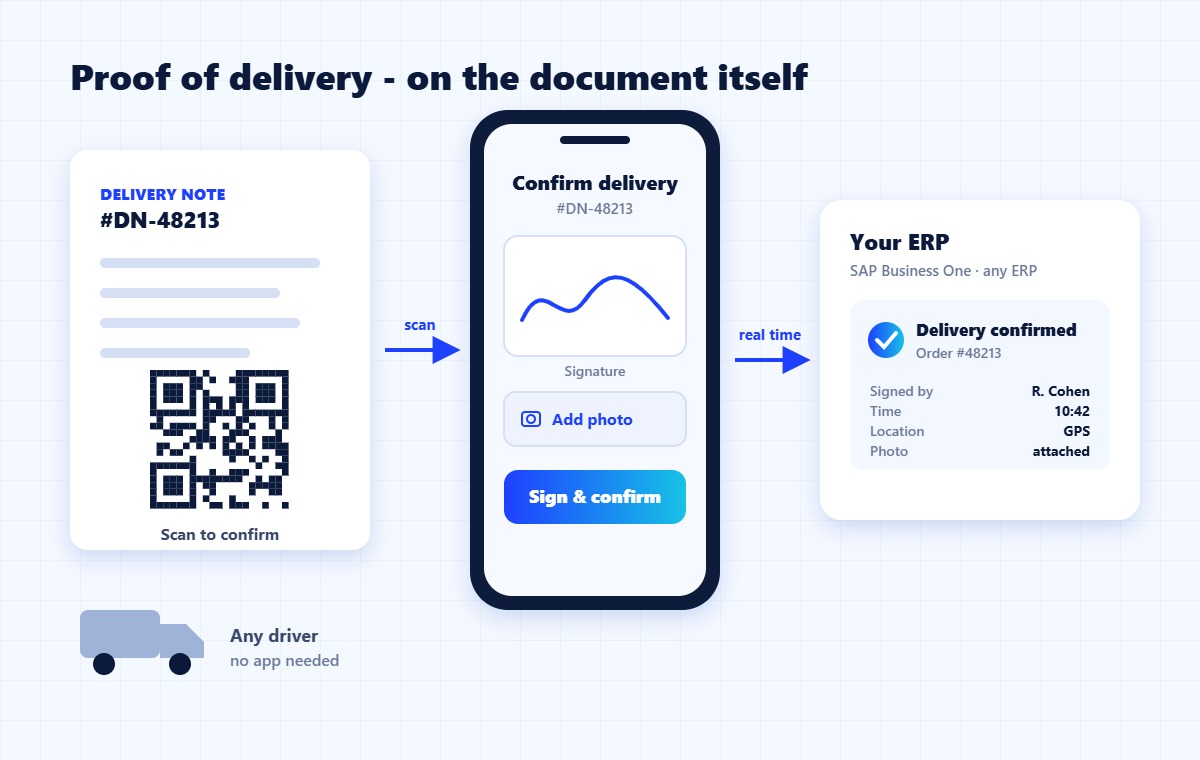
ShipSnap QR is the QR-on-the-delivery-note approach, built for distributors and 3PLs. Winsert adds the QR code when your existing delivery note or label prints, so there is no change to your ERP. The recipient scans it, signs and adds a photo on their own phone, and the signed document is synced to the order and customer record in SAP Business One or the ERP you run.
Your own fleet can keep using the ShipSnap driver app - both land in the same record.
A record showing that a specific shipment reached a specific recipient: who signed, when, where, and in what condition the goods arrived. It is what finance relies on to invoice, credit or settle a dispute.
You can wait for the carrier’s paperwork, use the carrier’s portal, ask external drivers to use your app, send the recipient a signing link, or print a QR code on the delivery note that the recipient scans and signs on their own phone. The last two keep the record in your system without depending on the carrier.
Yes. A QR code or a link opens a signing page in the phone’s browser – nothing to install. The recipient signs, can add a photo, and the record is saved with the time and location.
Then avoid any approach that depends on the driver: an app, a login or a device. Put the proof on the document itself, so whoever delivers it, the recipient can sign.
With ShipSnap QR, the signed document and delivery details are synced to the order and customer record in SAP Business One out of the box, and in Oracle, NetSuite, Priority, IBM AS/400 and other ERPs through Winsert.
Tell us who delivers for you and which ERP you run - we’ll show the flow on your documents.
Used in: 3PL & logistics · Wholesale & distribution · Building materials