When people talk about connecting systems, the reflex answer is “use the API”. But in many companies, the most reliable integration point already exists and runs every day: the Print button. This article explains why integrating through a virtual printer is not a stopgap for old systems, but often the shortest and most stable way to turn a document into an automated process. It also covers when an API is still the better choice.
Think about a delivery note. By the time it prints, the order has been approved, the goods have been picked and the shipment is on its way out. All the data is on the page, organized and formatted: customer, address, items, quantities and document number. The user clicks Print at exactly the right moment in the process, and nobody had to teach them a new habit. As integration events go, that is close to perfect. The only question is what you do with it.
1. Why “just connect it through the API” is not always simple
An API is a great tool, and when it exists and fits, you should use it. In practice, though, the road from “there is an API” to “the process works” is longer than it looks in a demo:
- Older systems simply have no API. Systems running on IBM AS/400, long-serving ERPs built twenty years ago, or an industry-specific system whose vendor has stopped developing it. They still run the business, but the only way they “talk” to the outside world is through printing and files.
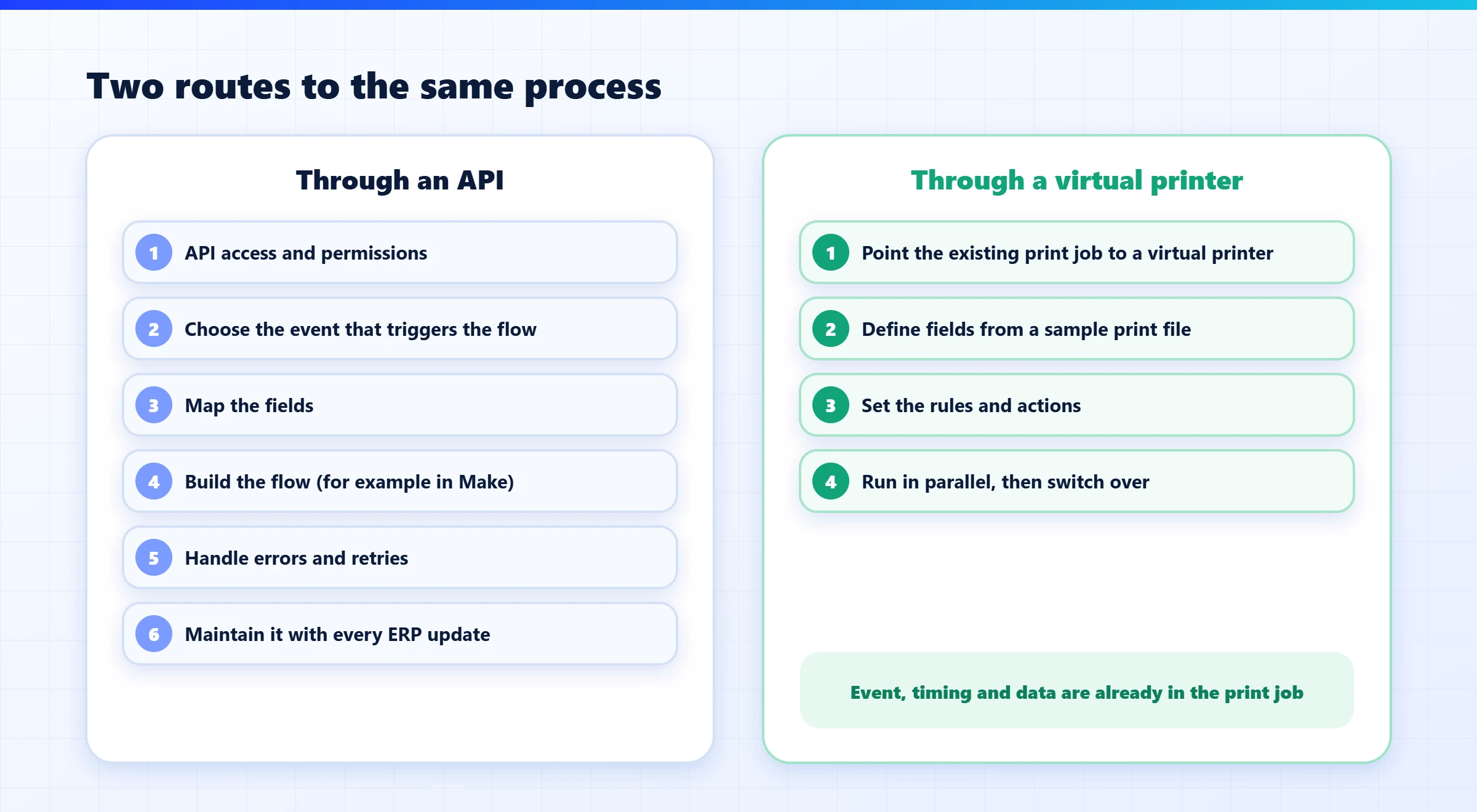
- Even with an API, someone has to build a process around it. Say your ERP is in the cloud and has a full API. Now someone has to decide which event triggers the process: a new document? A status change? When is the document really final? Someone has to map the fields, handle errors and retries, and build the flow in Make or a similar tool. Each of these steps is work, and each one is a place where things can break.
- The business logic already lives in the print. When a document is printed, to which printer and in how many copies: the ERP already knows all of that, because someone set it up years ago. An API-based process has to recreate those decisions from scratch.
- Maintenance. A flow built on an API needs someone who understands it, monitors it and fixes it when the ERP is updated or a field changes. In mid-sized companies, that “someone” is often an outside consultant or a single employee.
2. What a virtual printer actually is
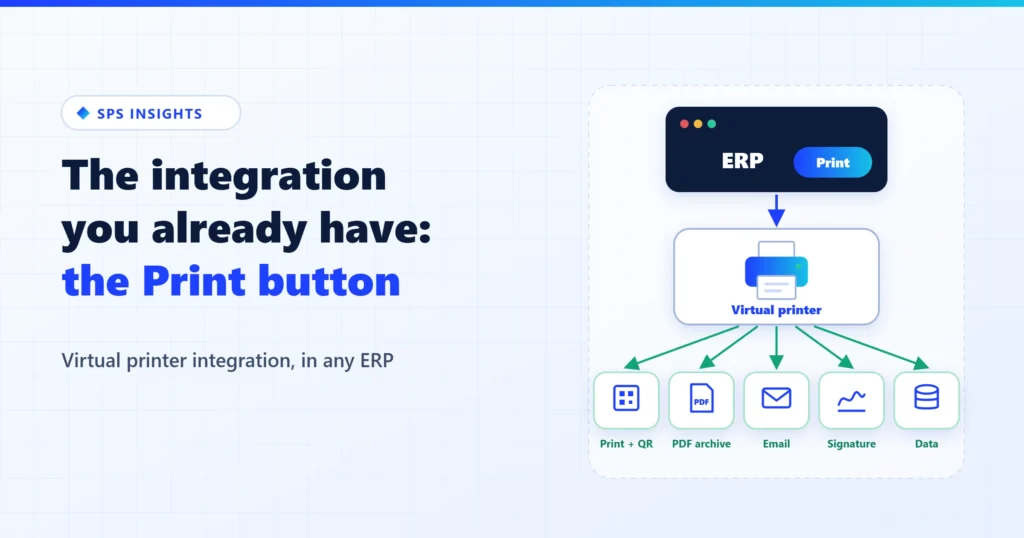
A virtual printer is software that looks to the ERP exactly like a regular printer. The ERP sends it whatever it has always printed, the same way it prints today, for example over LPD/LPR, RAW on port 9100 or a shared network printer. The difference is what happens next: instead of the page going straight to paper, the software reads it, extracts the business data and applies rules to it.
That is where it gets interesting, because one printed document can trigger several actions at once:
- Still print it, but with a new design, a logo, a barcode or a QR code added automatically.
- Save a PDF copy to the archive, with a file name and search keys taken from the data.
- Email it to the customer, the supplier or the driver, based on the data in the document.
- Send it for signature or approval, and return the signed document to the ERP.
- Pass the data to another system: route planning, a CRM, a database, or back into the ERP.
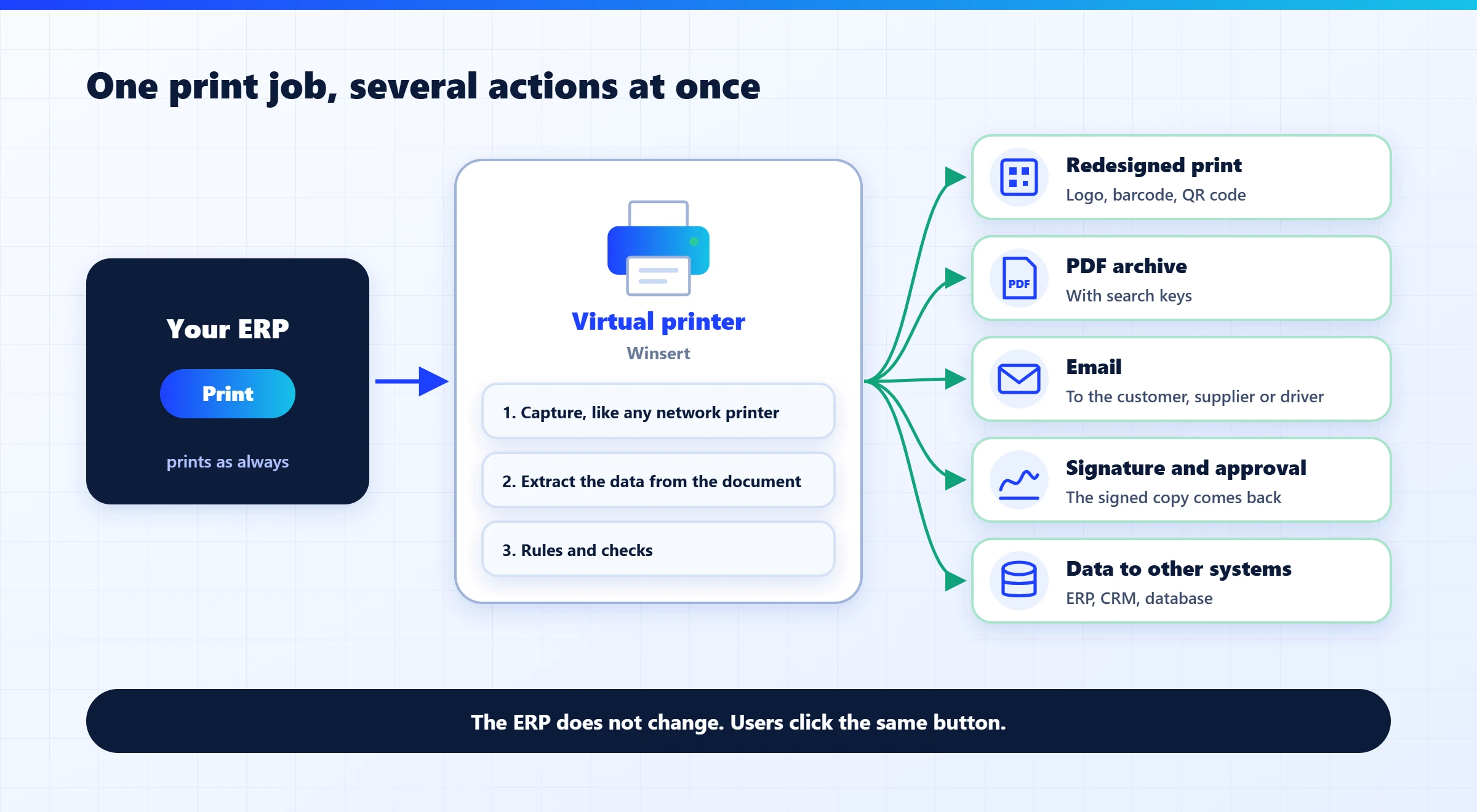
Notice what did not change: the ERP. Not a single line of code was written in it, no field was added, and users keep clicking the same button. Everything new happens after the print.
3. Building on what already works
The biggest advantage of this approach is operational, not technical: it builds on a process that already works. The print job has been tested for years, users know it, and it happens at exactly the right point in the business process. Instead of building a new process and hoping it sticks, you build on the existing one and add capabilities to it.
A few examples from the field:
- A delivery note that becomes digital proof of delivery. The ERP prints the delivery note as always. On its way to the printer, a QR code is added. At the last stop, the driver or the receiver scans it, signs on the phone, and the signed document goes back to the system. No app and no change to the ERP. (More on this in proof of delivery for drivers you don’t employ.)
- An invoice that sends itself. A printed invoice is saved as a PDF, emailed to the address defined for the customer and stored in the archive, with nobody scanning or attaching anything.
- An internal form that goes out for approval. A purchase order above a set amount, printed “for approval”, is sent automatically to the manager for signature, and the status goes back to the system.
- A legacy system that prints plain text. A system that prints text to a dot-matrix printer can produce the same document as a designed form on a laser printer, as a PDF for the archive or as a fax. Again, without touching the original application.
4. API or virtual printer: when to use which
There is no single winner. These questions help you choose:
- Does the system have an API at all? If not, the print job is almost always the natural integration point.
- Is the business event a document? If the process starts when a document is ready (a delivery note, an invoice, an order, a label), printing is exactly the right moment. If it starts from a data change that nobody prints, you need an API.
- Do you need to ask the system questions? Checking stock in real time or pulling data on demand is a job for an API or a database connection.
- Who will maintain it? If nobody in the company can build and maintain flows, a solution that uses what already exists is the safer choice.
- How many ERPs are involved? In a company with several systems, or a vendor serving customers on different systems, printing is a “language” every system speaks.
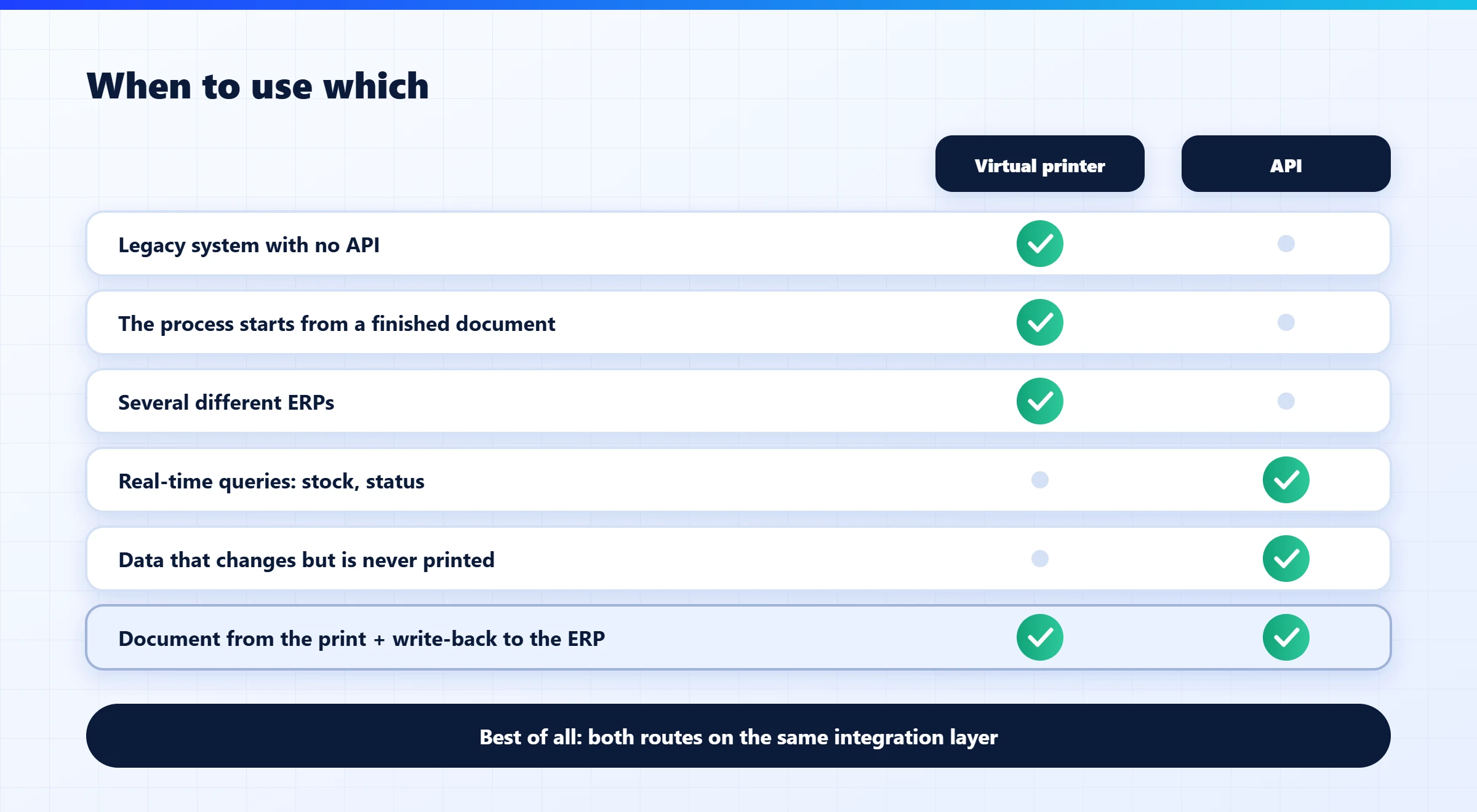
In practice, the best answer is often a combination: the document is captured from the print job, and any missing data is read or written back through an API or the database. That way you get the right moment and the complete document from the print, and access to the data from the API.
5. Three things to check before you start
- A sample print file. Every project like this starts with a sample of what the ERP sends to the printer. It shows which data is available and how to identify each field.
- A list of documents and printers. Which system prints what, and where. Usually you start with the one document that hurts most and expand from there.
- A parallel run. At first, the document keeps going to paper as it does today and also runs through the new process, until the results match. Only then do you switch over.
How it works with Winsert
SPS Winsert is the integration layer that all our products run on. It captures documents and data from virtual printers, monitored folders, email inboxes, SFTP and APIs; extracts the business data and applies rules, scripts and checks; and delivers the result to the ERP, a CRM, the archive or a database, in the right format. It can also add content to a document, change its layout, split or merge documents and convert file formats. For text-based legacy systems, SmartPrinter, part of the Winsert family, turns old print streams into designed modern output.
This is how we connect ShipSnap, DocReader, DocCycle and xPress3 to almost any ERP: natively to SAP Business One, and through Winsert to systems such as Oracle, NetSuite, Priority and IBM AS/400 (see ERP integrations). And when there is an API, Winsert uses it too. Choosing between the routes is not a matter of ideology, but of what works best for each customer.
Before you build a new process around your ERP, check what it already prints.
The bottom line
An API is not the goal; it is a means. The goal is for the right document to reach the right place at the right moment, without manual work. In many companies, that moment is already marked every day, on every delivery note and every invoice, the moment someone clicks Print. Integration through a virtual printer starts from that point, works with old and new systems alike, and does not require changing the ERP.
What does your ERP already print? Book a Winsert demo, send us a sample print file and the documents that hurt most, and we will show you how the same print job becomes an automated process, without changing your ERP.